
Learn Korean from a native teacher for absolutely FREE
My experience learning Korean online this year!

One fine day, I was scrolling through TikTok when I saw a post of a website that offers free online Korean lessons. One month in, and I’m loving my weekly Zoom lessons with my teacher from Korea! 🇰🇷🥰 What’s even better is that the lessons are 100% free and you get a certificate for completing the course!
So… How do you register for a free Korean lesson too?
Steps for registration
Go to King Sejong Institute website: https://www.iksi.or.kr/lms/main/main.do
Check for opening of new lessons
Click on Notice > Look out for ‘Semester Course Registration’
There are 4 semesters in a year. From what I saw in their past notices, it seems that the 1st semester usually begins registration in end May, and lesson officially begins in June. Meanwhile, the last semester begins registration in end September and commences lessons in October.
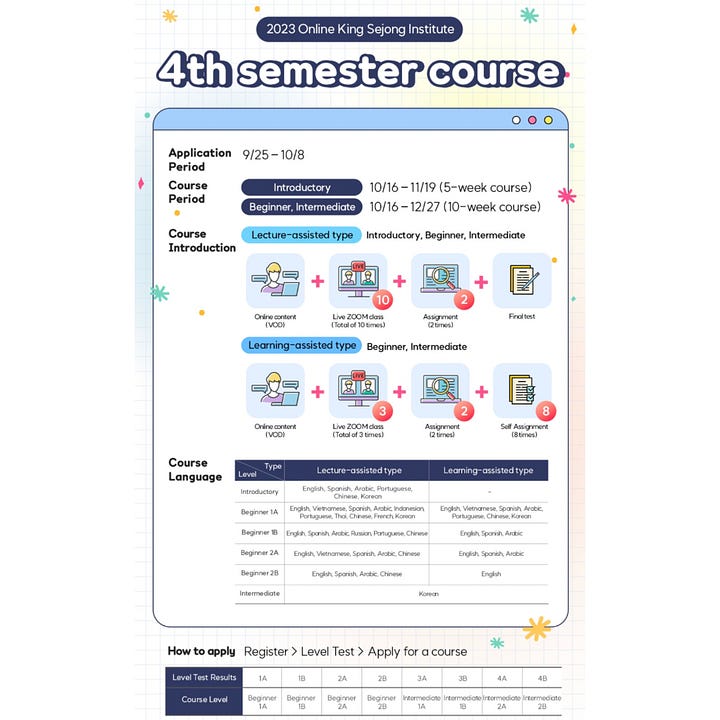
At the top of the notice, there are also pdf to detail the steps for application
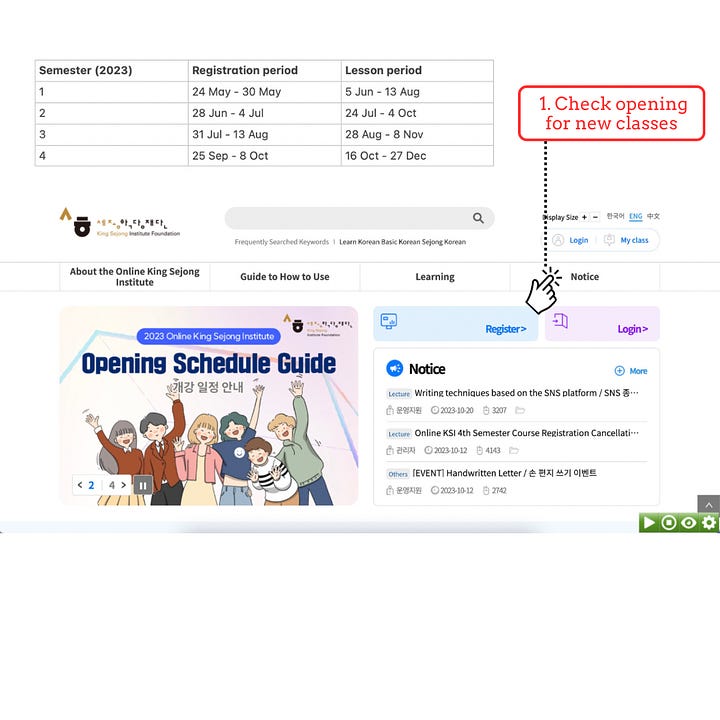
Check opening for new classes Register for an account
After you have checked that there is an upcoming course for registration, create an account in the main page
Click on Register > Choose ‘Learner’ > Check on the terms & conditions > Fill up your personal details to complete registration
You will need this account to take the level test and all future lessons
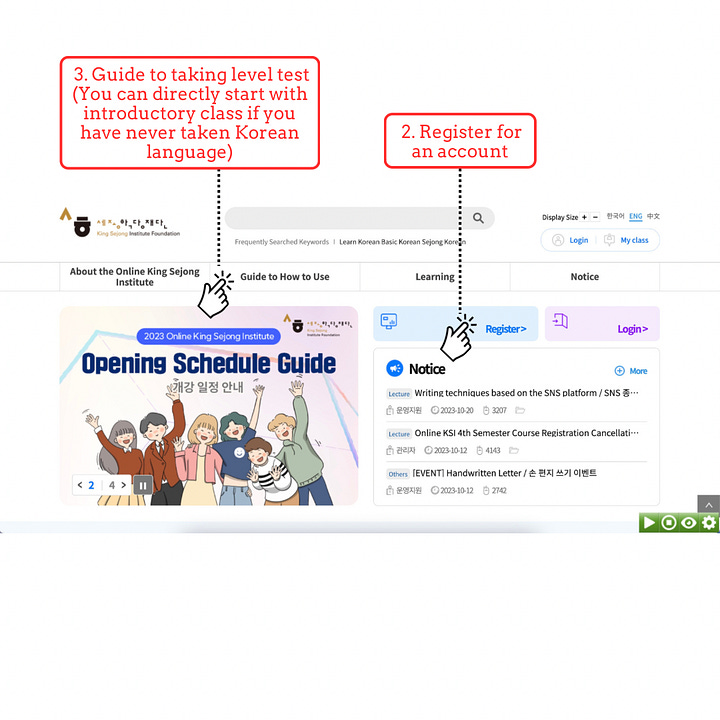

Register for an account & Take level test
Take a level test
If you have taken Korean before, you can take a level test to judge your proficiency in the language
Based on the level test outcome, you can choose to register for a course that is suitable for your learning
Click on ‘Guide to How to Use’ > Scroll down until you see ‘Start the King Sejong Institute Korean level test’ > Click on that to begin your test
The tests take around 30 min if I remembered correctly, and there are reading, listening and writing components, so do make sure that you are in the right setting before starting the test!
Register for course
Click on Learning > Choose ‘Cyber Korean Courses’
Look out for the level of course and course language that you prefer
Choose the course type that you prefer (Lecture-assisted vs. Learning assisted)
Check whether there are any remaining slots
Click into the course to see the detailed information, such as completion criteria, date and time of zoom lecture, and curriculum
Click on ‘Apply’ to sign up for the class during registration period (from notice)


Preparing for start of course
Around a week before your course starts, your teacher will email you (via the student email on the website, but it will be linked to your personal email) to let you know the zoom meeting details 📩 However, note that the email will be in Korean, so you will probably have to google translate that. Before your course starts, please ensure that you have noted the date and time of the zoom lecture (it will only take place at a specific day and time of the week during the lesson period, not every day of the week). This can be found on the page when you click into the course before registration. In particular, you will need to convert the time to your timezone because lesson timings are in KST⏱️


To access all the learning materials, including the videos, notices and assignments, click ‘My class’ on the main page. Upon pressing ‘Start’ for your course, you will find ‘Notice’ at the side panel. This is where your teacher will post notices including the syllabus, textbook and classroom expressions he/she will be using 📚
At the side panel on the left, there will also be ‘Join Lecture’ where the online video materials can be located. You are expected to watch these videos before attending the zoom lecture and finish 70% of them in order to earn the certificate. The videos typically begin with introduction of new vocabulary, then grammar. After which, there will be opportunities for you to follow the videos to practise reading and listening. In the second part of the video lectures, there will be simple exercises for you to complete (e.g. matching words/phrases to picture, typing in the blank space to complete the sentence). At the top of the page, you can toggle between the different lectures. There should be 10 for each Cyber Korean Course since it is a 10-week programme.
There are other tools on the side panel which you can explore, such as the learning road map, assignments and community. I will briefly mention just the assignments and community. As there are assignments for each Cyber Korean Course, you will need to click on ‘Assignment’ at the side panel and type in your answers to submit them. But this is less of a worry, because the teacher will post a notice with the assignment submission guide. The community is essentially a forum, whereby you can post and view short write-ups by other learners in the class, as the teacher may sometimes assign optional task (e.g. write self-introduction) 📝
Cyber Korean Course vs. Self-Learning Korean Course
Some of you might have noticed that there are both Cyber Korean Course and Self-Learning Korean Course under the ‘Learning’ tab of the main page. The main difference between them is that Cyber Korean Course includes Zoom sessions with Korean teachers, where you get the chance to speak and practise your Korean. Meanwhile, the Self-Learning Korean Course is a self-paced programme, essentially just the videos that you watch before your Cyber Korean Course. In the Cyber Korean Course, you also have assignments and a final test, whereas the Self-Learning Korean Course does not have any of these. Another difference is that the Self-Learning Korean Course is available all time throughout the year, so you do not have to wait under the semester course registration period begins!
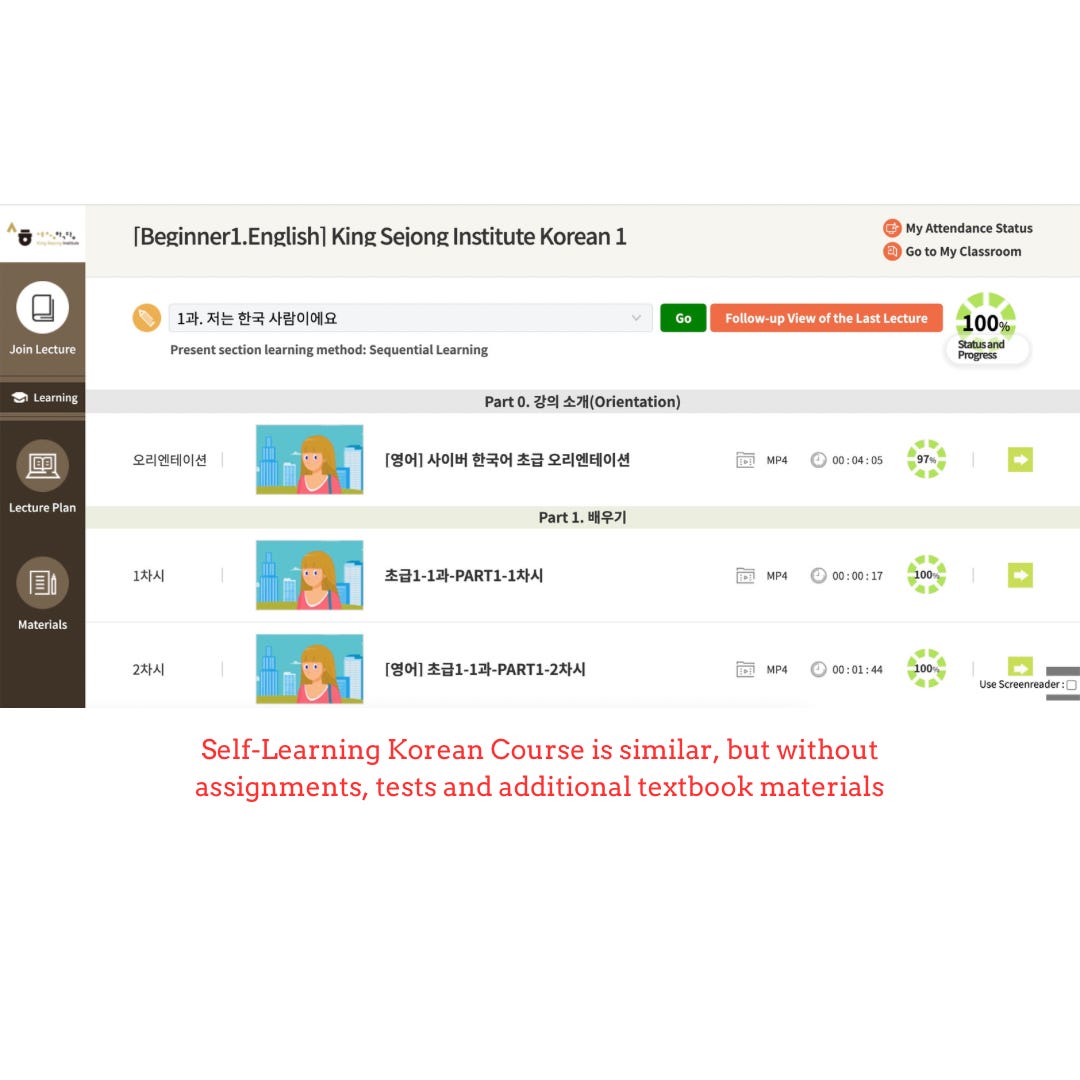
Personal experience & Tips
To provide context, I took the lecture-assisted (10-week zoom) Beginner 1A course, even though according to the level test I am at Beginner 1B standard. Therefore, my experience is based on my Beginner 1A course, which might differ from the introductory course or higher level courses.
It takes me around an hour to finish watching all the video lectures for a session and the zoom lectures take another 2 hours each week 😐 As you can tell, it is quite time consuming to commit to the Cyber Korean Course, so I would advise to take on Self-Learning Korean Course if you do not have so much time to spare weekly. On the other hand, if you want to learn Korean quickly, the Cyber Korean Course is recommended because when else will you get the chance to practise speaking and reading in Korean?
According to the website, there are different course languages e.g. English, Chinese, Spanish for the introductory to beginner classes. The English one was the most popular and the slots were snagged up immediately after it was released, so I had no choice but to register for the Chinese one. However, during my zoom sessions with the teacher, she spoke in Korean 99.9% of the time. I realised that the Chinese aspect of the course is that the pre-lesson video lectures are in Chinese. Nonetheless, my teacher still understood English and Chinese and was able to translate if required. I guess this is a good thing though, because it really forces you to listen and answer in Korean all the time. The only downside would be it can be intimidating if you are not familiar with Korean and unable to understand instructions in Korean at all 🫣
During registration, there were supposed to be 20 slots. However, when I turned up for my first zoom session, there were only 12 people in total (currently dropped to 9 of us). The other learners come from different countries, like Malaysia, Vietnam and Taiwan, and they were all females. It was quite fascinating to see people from diverse backgrounds coming together to learn a language! 🤩 I would expect the nationalities of the learners to be different for other course language.
In terms of how the zoom lectures were conducted, my teacher would go through the vocabulary and grammar taught in the pre-lesson video lectures. She would usually include more vocabulary words, then allow us to practise applying the particles with the words/phrases. She would call our names one by one to give verbal responses. Generally, there was a lot of reading and speaking, so being familiar with the Hangeul is definitely useful!
There was also some writing involved, as the teacher sometimes would ask us to type responses in the zoom chat. Therefore, I would recommend everyone to get the Korean keyboard sleeve so that you can place above your keyboard for the lesson! ⌨️
Another point to note is that my teacher requested for us to turn on our video camera each time during the zoom lectures. (I am not sure if this is the same for other teachers/courses) 👩🏫 Also, there was a lot of participation involved in the lectures as we needed to turn on our microphones to read and respond. Therefore, if you do not like this style of lecture, the Self-Learning Korean Course might be a better option!
All in all, I really enjoyed my one month studying Korean and I look forward to the future 6 lessons! ☺️ My teacher is a really kind and patient lady who encourages every one of us to speak Korean! Coming from someone who had previously taken a semester module of Korean language in university, I think the quality and mode of teaching is comparable and I will 10000% recommend this course to anyone who has time, and wants to pick up Korean! I am not sure how long this course will remain free, so take your chance and apply for the next round!!! 👍🏻👍🏻